Introduction
Flipper Zero is a portable multi-tool for pentesters and geeks in a toy-like body. It loves hacking digital stuff, such as radio protocols, access control systems, hardware and more. It's fully open-source and customizable, so you can extend it in whatever way you like.


-
-
Do not use alcohol or alcohol containing cleaners, tissues, whipes, or sanitizers on the screen protector glass! It can permanently damage the screen protector glass
-
The top shell, the IR cover and the screen protector glass are one solid part and can't be disassembled
-
Long screw size 1.8 x 8 mm
-
Short screw size 1.8 x 4.5 mm
-
-
-
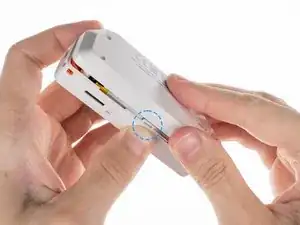
To remove the back cover you need to release the latches by pressing the middle of the top cover on both sides, one by one. After releasing the latches, you can remove the bottom cover
-
-
-
The board with the NFC antenna is glued to the bottom cover of the case with adhesive tape. To remove the board, it is necessary to gently pry one of the edges of the board with a plastic pick to peel off the adhesive tape
-
-
-
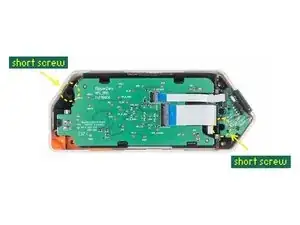
Unscrew two short screws with PH0 screwdriver to get the chassis with components out of the top cover
-
-
-
Disconnect the flat cables from the board. Use a plastic pick to lift the latches up to open the locks
-
-
-
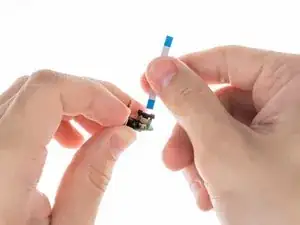
To disconnect the flat cable from the iButton board, use a flat screwdriver to open the lock by pulling the latch up
-
-
-
Release the board from the latches by pressing on the edge of the chassis near the specific latch in the specified sequence
-
-
-
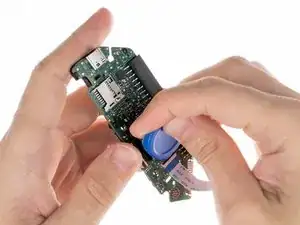
The battery is glued with double-sided tape. Gently peel the battery off the chassis with a plastic pick
-
-
-
Disconnect the flat cable from the board. Lift the latch up with a plastic pick to open the lock
-
-
-
To remove the chassis containing the buttons, unscrew two short screws with a PH0 screwdriver
-
-
-
To remove the buttons you need to release the latches. The central button (OK) is removed after the navigation button (joystick)
-
-
-
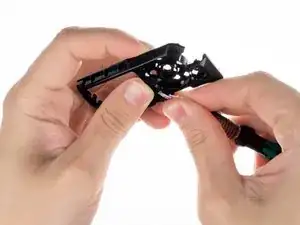
Release the latches with a flat screwdriver. You need to be careful with the springs under the buttons
-












6 comments
I'd say, that long screws requires PH1 screwdriver.
Evge Key -
Agree with Evge, when I read "PH0" I picked mine but they wouldn't quite fit. I had to use a PH1 (1.2 to be exact, according to toolset casing) to be able to unscrew the chasis and get to the battery (I had to only remove and plug back the battery cable to fix my problem)
Careful with those screws. They are not great quality and strip easily.