
Introduction
Follow this tutorial to replace the processor (CPU) with an Intel i7 3770S processor or a more powerful processor.
Tools
-
-
Make sure the power to the computer is turned off
-
Turn the computer over
-
Remove the 6 Allen screws with a 2mm wrench.
-
Carefully lay down the back, the side to the right and left of the case.
-
-
-
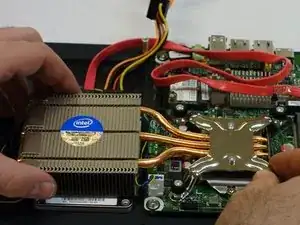
Use a Phillips #2 screwdriver to loosen the four processor heatsink fasteners.
-
Remove the heatsink.
-
-
-
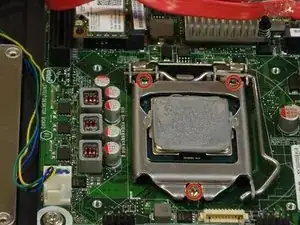
Use a Phillips #2 screwdriver to unscrew the 3 screws from the processor positioning frame.
-
Release the fastening spring.
-
Lay the processor (CPU) down
-
If you have no other choice, carefully collect all of the thermal paste.
-





Conclusion
Follow these steps in reverse order to reassemble your device
