Introduction

Use this guide to replace a broken thumbstick on your Razer Kishi.

Both controller sides of the Razer Kishi are almost identical in construction. The replacement of the thumbsticks are similar on both sides, therefore we will only show the right side in this guide.

  1. ZsQTaZjqv6qyxclm
    • The opening process is the same on both sides. For simplicity, this guide shows only the right-side opening process. Unscrew whichever side you wish to open and work on.

    • For the right side, remove the five Y0 screws securing the right side of the controller.

    • Four 9.2 mm screws

    • One 7.2 mm screw

    • If you wish to open the left side, remove the five Y0 screws securing the left side of the controller.

    • Four 9.2 mm screws

    • One 7.2 mm screw

  2. GBYT3l1JQI1klrJF
    GBYT3l1JQI1klrJF
    ABTZOrHBxBJQODSx
    5tBZLnQyNfh5Ryad
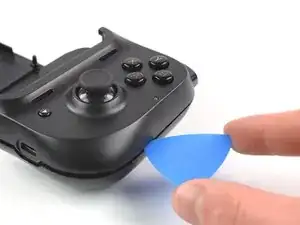
    • Both cases are held together by plastic clips.

    • Insert an opening pick in the seam between the top and bottom case, at the bottom left corner of the controller.

    • With the pick still in the seam, slide it along the bottom edge to the bottom right corner to loosen the plastic clips.

  3. 4eVLGWoQLpMt5mOy
    4eVLGWoQLpMt5mOy
    ChPKLarayLVEACmg
    • Slide the opening pick along the right edge to loosen the plastic clips.

  4. lLInivpTrkn6Q6Q6
    lLInivpTrkn6Q6Q6
    266AxEQXlBUIHFcU
    • Slide the opening pick along the top edge to loosen the remaining plastic clips.

    • Don't try to remove the top side yet, the case is still connected to the board.

  5. DpyMIvfffLhtnj6j
    DpyMIvfffLhtnj6j
    lPis15eO3pD5JKUh
    PlswYISvGHE1BtJ3
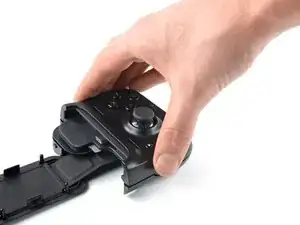
    • Carefully lift the top side and unfold it to the right, like a book.

  6. gPHMigOchnXaqynE
    gPHMigOchnXaqynE
    vWZ5QoSsBGMIacE5
    KvZaXgvL5W3Bjs4m
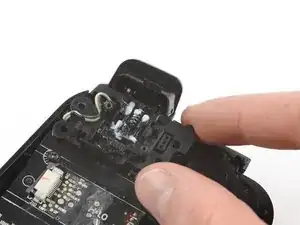
    • Using the pointed end of a spudger, push the grey tabs on the interconnect socket away from the socket, parallel to the interconnect cable, to release the cable.

    • Pull the cable out of the socket.

  7. Z6Y3RS5pjXnYPLlS
    • Use a Phillips #0 screwdriver to remove the two 4.4 mm-long screws securing the trigger board.

  8. nyCJQtxgXe1abwUu
    nyCJQtxgXe1abwUu
    iBH5uaM25xQHkDJ1
    vAlYNZgnwsE6ffis
    • The breakout board is plugged in. When removing breakout board, it is important to pull it straight out to avoid bending the connectors.

    • Remove the breakout board by lifting it straight up, away from the controller.

  9. QJtOBeEycsUgh1XX
    • Use a Phillips #0 screwdriver to remove the two 7.0 mm-long screws securing the trigger.

    These are #00 screws on mine

    JM Palacios -

  10. XUOOHSJRrtCoPIIv
    XUOOHSJRrtCoPIIv
    HPAqiPYkiZ1VBygg
    • Remove the shoulder trigger.

  11. dcVOGAveYWDwSFZJ
    dcVOGAveYWDwSFZJ
    DAoekp65OGByC1M6
    • Use a pair of blunt nose tweezers to lift out the shoulder button board.

    This step is difficult as the board is in very tightly, but it can be skipped. The cord allows enough flexibility to just remove the board in the next step to get to the screws for the phone bracket and the USB connector.

    JM Palacios -

  12. mkCQ4oCuRjvnvP35
    • Use a Phillips #0 screwdriver to remove the two 5.9 mm-long screws.

  13. gT3cWmL4JRdQBRMR
    gT3cWmL4JRdQBRMR
    kjBdcksYJTPQnGMf
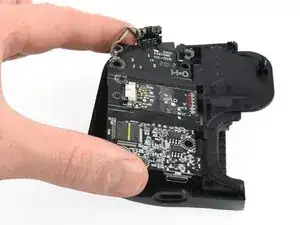
    • Remove the mainboard.

  14. LGxKlO5BqGasfQpD
    LGxKlO5BqGasfQpD
    2LUtsNbTENYJGGd1
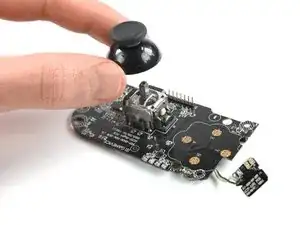
    • Remove the thumbstick by pulling away from the board.

Conclusion

To reassemble your device, follow these instructions in reverse order.

Take your e-waste to an R2 or e-Stewards certified recycler.

Repair didn’t go as planned? Try some basic troubleshooting, or ask our Answers community for help.

Adriana Zwink

Member since: 18/12/19

36203 Reputation

4 comments

Could anyone provide the link to buy that thumbstick?

Terry -

I second the previous comment. Where can you buy these thumbsticks?

Matthew Miller -

Has anyone had any luck buying the thumbstick for this

Kurt Kedroe -

tbh, the replacement is pretty straightforward if you've ever done anything like this. The problem is (like everybody above me said) it's hard to find the appropriate replacement thumbstick, as regular thumbsticks don't work! I've tried ps4, Xbox one, 360, original Xbox, switch pro... And to be clear, a lot of these will fit onto the metal rod, but once you close it up there isn't enough clearance for the joystick to move. Kishi's thumbstick is a unique profile that may as well be proprietary.

Regardless, if I find a solution, I will share it with ya'll :)

Derek Wing -