Introduction
This guide is necessary for times when the RAM is thought to be the cause of slow response times or blank screens. Replacing or reseating the RAM may increase the system's speed or fix blank screen issues.
Tools

Parts
-
-
Remove the single Phillips #0 screw that is holding down the battery and ram panel.
-
Remove the battery and ram panel.
-
-
-
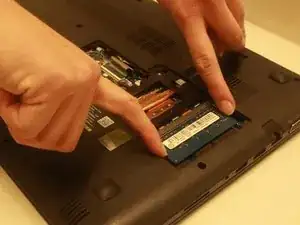
Remove the RAM by pushing the two metal clamps away from each other length-wise on the chip.
-
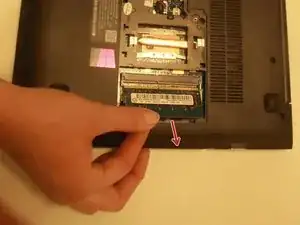
After hearing a click sound, pull the RAM out from the brackets.
-



Conclusion
To reassemble your device, follow these instructions in reverse order.
