
Introduction
Replace the battery of your Lenovo IdeaPad 310 Touch-15ISK. This simple guide will describe how to access and remove the internal battery for replacement. The battery is fairly buried within the computer so the removal of major components is required.
Tools

-
-
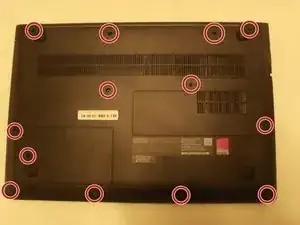
Flip the laptop over and remove the 13 Phillips #1 screws from the bottom panel.
-
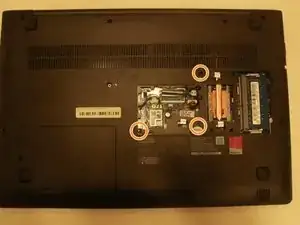
Remove the 3 Phillips #1 screws holding RAM panel in and then remove RAM panel
-
-
-
Flip laptop back over.
-
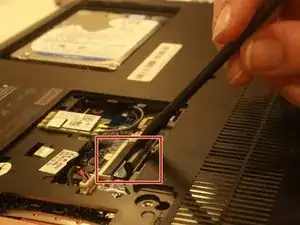
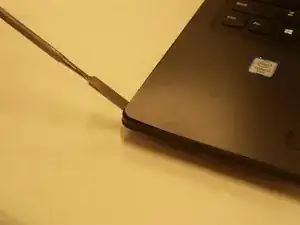
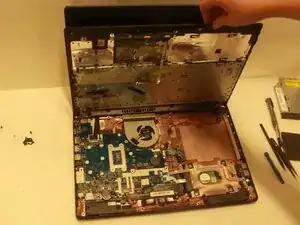
Using a plastic spudger, pry between the keyboard panel and bottom panel on all 4 sides.
-
-
-
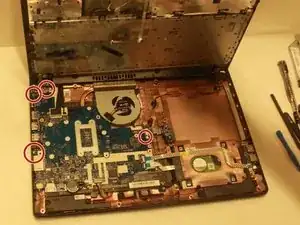
Remove the 4 Phillips #0 screws holding the motherboard to the computer.
-
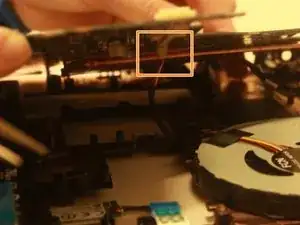
Disconnect the fan tab on the bottom of the motherboard.
-
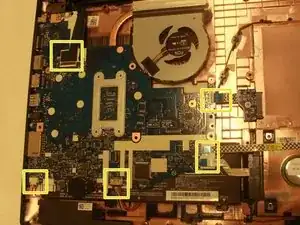
Remove the 5 tabs holding the motherboard to the computer and remove the motherboard.
-
-
-
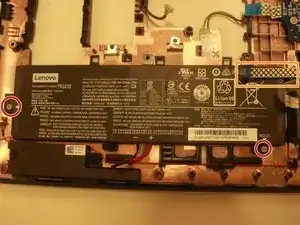
Unscrew the 2 Phillips #0 screws holding the battery in place.
-
Remove wire tab holding battery in place.
-
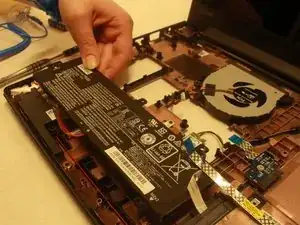
Carefully remove battery.
-
To reassemble your device, follow these instructions in reverse order.

4 comments
Step 2 should include removing connectors for the wireless card.
Thanks for your commentary, I have added this in my French translation but I don’t know why I can’t modify the tutorial in English.. Maybe because I am a French member..
The fan should also be disconnected in step 2 not step 4.
WWow It's Great
Denveer -